
Type in Baybayin in 1 Click – Free Tagalog Alphabet Keyboard
Are you looking to type in the ancient Tagalog Baybayin script online? Discover our Baybayin Alphabet Online Keyboard—a simple, intuitive tool designed to help you write in Baybayin directly from your browser. Whether you’re a language enthusiast, a cultural researcher, or a student exploring Filipino heritage, this virtual keyboard is perfect for learning and typing Baybayin anytime, anywhere.
Use our Tagalog Baybayin Alphabet Online Keyboard to type easily in the ancient Baybayin alphabet, the traditional script of the Philippines. This free online tool lets you write in Baybayin directly from your browser—no download or special fonts needed. Whether you’re a student, educator, researcher, or heritage enthusiast, this Baybayin alphabet keyboard is perfect for learning, practicing, or sharing the beauty of this historical writing system.
The Baybayin alphabet is an important part of pre-colonial Filipino culture. Our online keyboard supports all major Baybayin characters, including vowels, consonants, and kudlit marks. It’s a powerful tool for cultural expression, historical education, and creative writing in Tagalog using the native script. For more information about Baybayin’s history and its cultural significance, visit the National Commission for Culture and the Arts or learn more about Baybayin on Wikipedia.
This Baybayin alphabet keyboard is compatible with all devices, including desktops, laptops, tablets, and smartphones. It works on any browser—no installation or registration required. Just open the website, start typing, and copy the text wherever you need it.
Explore Filipino identity through language by using the Baybayin alphabet in your messages, social media posts, educational materials, or art projects. As interest in indigenous scripts continues to grow, learning and using the Baybayin alphabet helps preserve a vital piece of Filipino heritage. You can also explore Baybayin as part of a larger movement to revive indigenous scripts through organizations like the Philippine Indigenous Language Program.
Start typing with our Tagalog Baybayin Alphabet Online Keyboard today. It’s easy to use, mobile-friendly, and completely free. Rediscover the unique beauty of the Baybayin alphabet—anytime, anywhere.
Features of Our Baybayin Online Keyboard
- ✅ Type Baybayin Characters Instantly
Easily input Baybayin syllables using your regular keyboard layout. - ✅ Mobile & Desktop Friendly
Access and use the keyboard from any device—no app installation required. - ✅ Copy & Paste Ready
Once you’ve typed your text, just copy it and paste it wherever you need. - ✅ Educational Tool
Great for learning and teaching the Baybayin alphabet in schools or cultural programs.
Why Use a Baybayin Online Keyboard?
Typing Baybayin by hand can be difficult without the right tools. This online Baybayin keyboard makes the process fast and user-friendly, helping preserve and promote this beautiful part of Filipino history. Whether you’re writing a poem, creating art, or simply experimenting, this tool lets you experience the power of pre-colonial Philippine writing.
How to Use the Tagalog Baybayin Keyboard
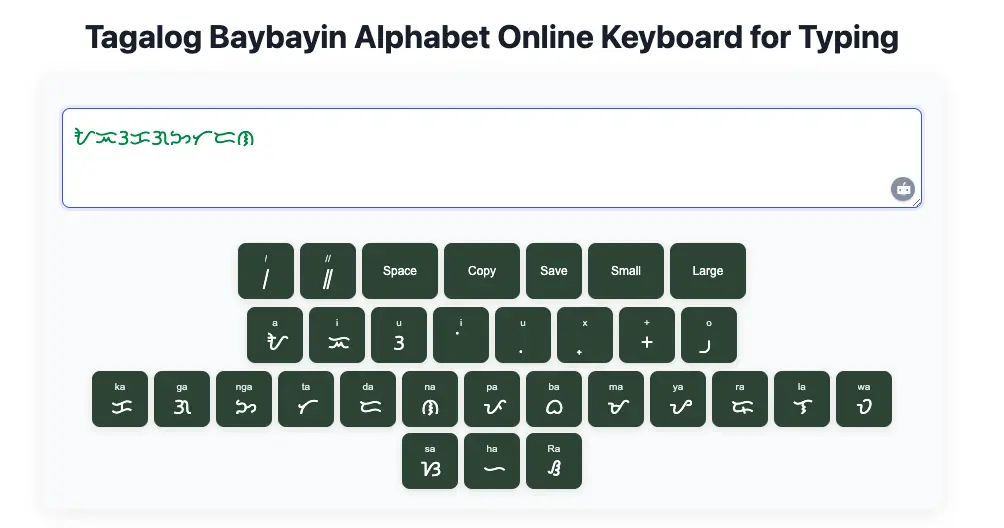
- Open the Online Keyboard on your device.
- Click or press keys to type Baybayin characters.
- View real-time output as you type.
- Copy the text and paste it into documents, social media, or design software.
Learn and Share Baybayin
Revive a nearly lost tradition by using Baybayin in your daily life. Share your creations on social media, in classrooms, or with friends and family. Our tool supports both casual users and serious learners who want to master the Baybayin script.
Do I Need a Font to Display Baybayin Characters?
Yes, you may need a dedicated font to properly display Baybayin characters on certain devices and platforms. Baybayin is an ancient Filipino script that is not universally supported by default system fonts, especially on older operating systems or browsers. Without the correct font installed, Baybayin symbols may appear as boxes, question marks, or missing characters.
To ensure accurate display, downloading and installing a Baybayin font is highly recommended. There are several free and open-source Baybayin fonts available online that are easy to install on both desktop and mobile devices. Fonts like “Noto Sans Baybayin” and “Baybayin Modern Unicode” are commonly used and compatible with most modern systems.
Some Baybayin translator tools and mobile apps have built-in font rendering, so you might not need to install a separate font when using those platforms. However, if you plan to copy the Baybayin text into design software, word processors, websites, or other custom projects, having a Baybayin font installed is important to maintain the integrity of the script.
Using a proper Baybayin font also helps enhance the visual quality of your work and preserves the script’s traditional appearance. Whether you’re creating cultural content, educational material, tattoos, or personalized gifts, the right font ensures clarity and authenticity.